Icon Time TotalPass B600 Biometric Fingerprint Time Clock – Complete Guide, Features, Benefits & Setup
Managing employee attendance manually can be time-consuming and prone to errors. Modern businesses are increasingly adopting biometric attendance systems to improve accuracy and efficiency. One such reliable solution is the Icon Time TotalPass B600 Biometric Fingerprint Time Clock, a powerful attendance tracking device designed for small to medium-sized businesses.
This blog will explain everything you need to know about the Icon Time TotalPass B600, including its features, benefits, installation process, and why it is a great choice for businesses that want accurate employee time tracking.
Introduction to Icon Time TotalPass B600
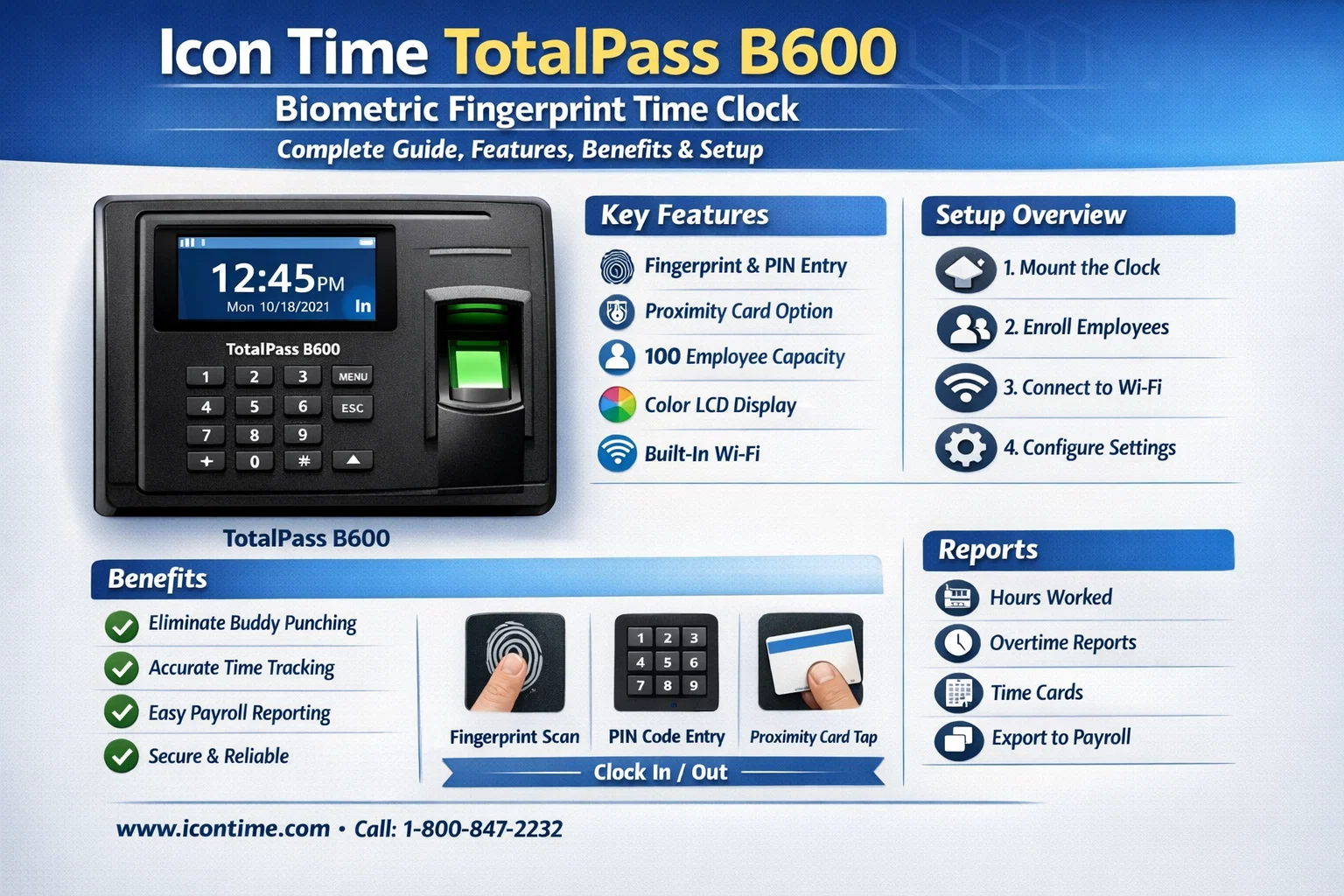
The Icon Time TotalPass B600 Biometric Fingerprint Time Clock is a biometric time and attendance system that uses fingerprint recognition technology to track employee clock-ins and clock-outs. Unlike traditional punch cards or PIN systems, biometric authentication ensures that only the authorized employee can record their attendance.
This device eliminates common attendance issues such as:
- Buddy punching
- Manual entry errors
- Lost punch cards
- Time theft
The TotalPass B600 stores employee data securely and provides accurate reports for payroll processing and workforce management.
Key Features of Icon Time TotalPass B600
1. Advanced Biometric Fingerprint Technology
The TotalPass B600 uses advanced fingerprint scanning technology that allows employees to clock in and out quickly with a simple finger scan.
Benefits include:
- High accuracy
- Fast recognition
- Secure employee identification
Since fingerprints are unique, the system ensures that no one else can clock in for another employee.
2. No Monthly Subscription Required
One of the biggest advantages of the Icon Time TotalPass B600 Biometric Fingerprint Time Clock is that it does not require monthly subscription fees. Once purchased, businesses can use the system without recurring costs.
This makes it a cost-effective solution for small businesses.
3. Supports Multiple Employees
The device can store fingerprints for multiple employees, making it suitable for growing companies.
Typical capacity includes:
- Hundreds of employee fingerprints
- Thousands of punch records
- Multiple departments
This ensures scalability as your workforce expands.
4. Built-in Time and Attendance Software
Unlike many biometric devices that require external software, the TotalPass B600 comes with built-in web-based attendance management software.
This allows administrators to:
- Monitor employee attendance
- Generate reports
- Manage schedules
- Track overtime
All operations can be managed through a web browser.
5. Ethernet Connectivity
The device connects to your network via Ethernet, enabling managers to access attendance data from a computer on the same network.
This makes data management simple and efficient.
6. Employee Self-Service
Employees can easily check their attendance information directly from the system.
They can view:
- Total hours worked
- Attendance history
- Punch details
This improves transparency within the organization.
Benefits of Using Icon Time TotalPass B600
Improved Attendance Accuracy
Manual attendance systems often lead to errors and manipulation. The biometric system ensures accurate and tamper-proof attendance records.
Eliminates Buddy Punching
Buddy punching occurs when one employee clocks in for another. Since the Icon Time TotalPass B600 Biometric Fingerprint Time Clock uses fingerprint authentication, this problem is completely eliminated.
Saves Administrative Time
HR departments often spend hours calculating attendance manually. With automated reporting, payroll processing becomes much easier.
Enhances Workforce Productivity
When employees know that attendance is being tracked accurately, they tend to be more punctual and disciplined.
Secure Data Storage
All employee attendance data is stored securely in the system and can be backed up regularly to prevent data loss.
Technical Specifications
Below are the general specifications of the Icon Time TotalPass B600 Biometric Fingerprint Time Clock:
| Feature | Details |
|---|---|
| Authentication Method | Biometric Fingerprint |
| Connectivity | Ethernet |
| Software | Built-in Web Based Software |
| Employee Capacity | Hundreds of Employees |
| Data Storage | Thousands of Punch Records |
| Display | LCD Screen |
| Installation | Wall Mounted |
How to Install Icon Time TotalPass B600
Setting up the device is simple and can usually be completed within minutes.
Step 1: Mount the Device
Install the device on a wall near the office entrance so employees can easily clock in and out.
Step 2: Connect Power and Network
Connect the device to:
- Power adapter
- Ethernet network cable
This allows the system to communicate with your company network.
Step 3: Access the Web Interface
Open a browser on your computer and access the device using its IP address.
Step 4: Add Employees
Register employee information and record their fingerprints in the system.
Step 5: Configure Attendance Settings
Set up:
- Work schedules
- Overtime rules
- Department settings
Once configured, the system is ready for use.
Who Should Use This Biometric Time Clock?
The Icon Time TotalPass B600 Biometric Fingerprint Time Clock is ideal for many types of businesses, including:
- Offices
- Retail stores
- Manufacturing units
- Warehouses
- Hospitals
- Educational institutions
Any organization that wants accurate attendance tracking can benefit from this system.
Pros and Cons
Pros
| Advantages |
|---|
| Highly accurate biometric authentication |
| Eliminates buddy punching |
| No monthly subscription |
| Easy installation |
| Built-in attendance software |
| Secure employee data |
Cons
| Limitations |
|---|
| Requires Ethernet network |
| Initial device cost |
| Needs fingerprint enrollment for each employee |
Tips for Using the System Effectively
To get the best performance from your biometric attendance system:
- Enroll fingerprints carefully during registration
- Regularly back up attendance data
- Place the device in an accessible location
- Train employees on proper fingerprint scanning
- Clean the fingerprint sensor regularly
These practices ensure smooth operation and accurate attendance tracking.
Frequently Asked Questions (FAQs)
1. How many employees can the system support?
The Icon Time TotalPass B600 Biometric Fingerprint Time Clock can support hundreds of employees, making it suitable for small and medium-sized businesses.
2. Does the system require internet access?
No. The device works on a local network using Ethernet and does not require internet access for basic operations.
3. Can attendance reports be exported?
Yes. The system allows administrators to generate and export attendance reports for payroll processing.
4. Is the fingerprint data secure?
Yes. The fingerprint data is stored securely within the system and cannot be easily duplicated.
5. Can the system track overtime?
Yes. The built-in attendance software allows you to configure work schedules and track overtime hours automatically.
Conclusion
The Icon Time TotalPass B600 Biometric Fingerprint Time Clock is a powerful and reliable solution for businesses that want to automate employee attendance tracking. With advanced biometric technology, built-in software, and secure data storage, it provides an efficient way to manage workforce attendance without the need for monthly subscriptions.
By implementing this system, businesses can improve productivity, eliminate attendance fraud, and simplify payroll processing.