Sharp XE-A41S Electronic Cash Register – A Complete Guide for Modern Retail Businesses
In today’s fast-paced retail environment, having an efficient and reliable billing system is essential. The Sharp XE-A41S Electronic Cash Register stands out as a smart solution for small to medium-sized businesses looking to streamline transactions, manage inventory, and improve customer service. This blog will explore its features, benefits, and why it’s a great investment for your business.
Introduction to Sharp XE-A41S
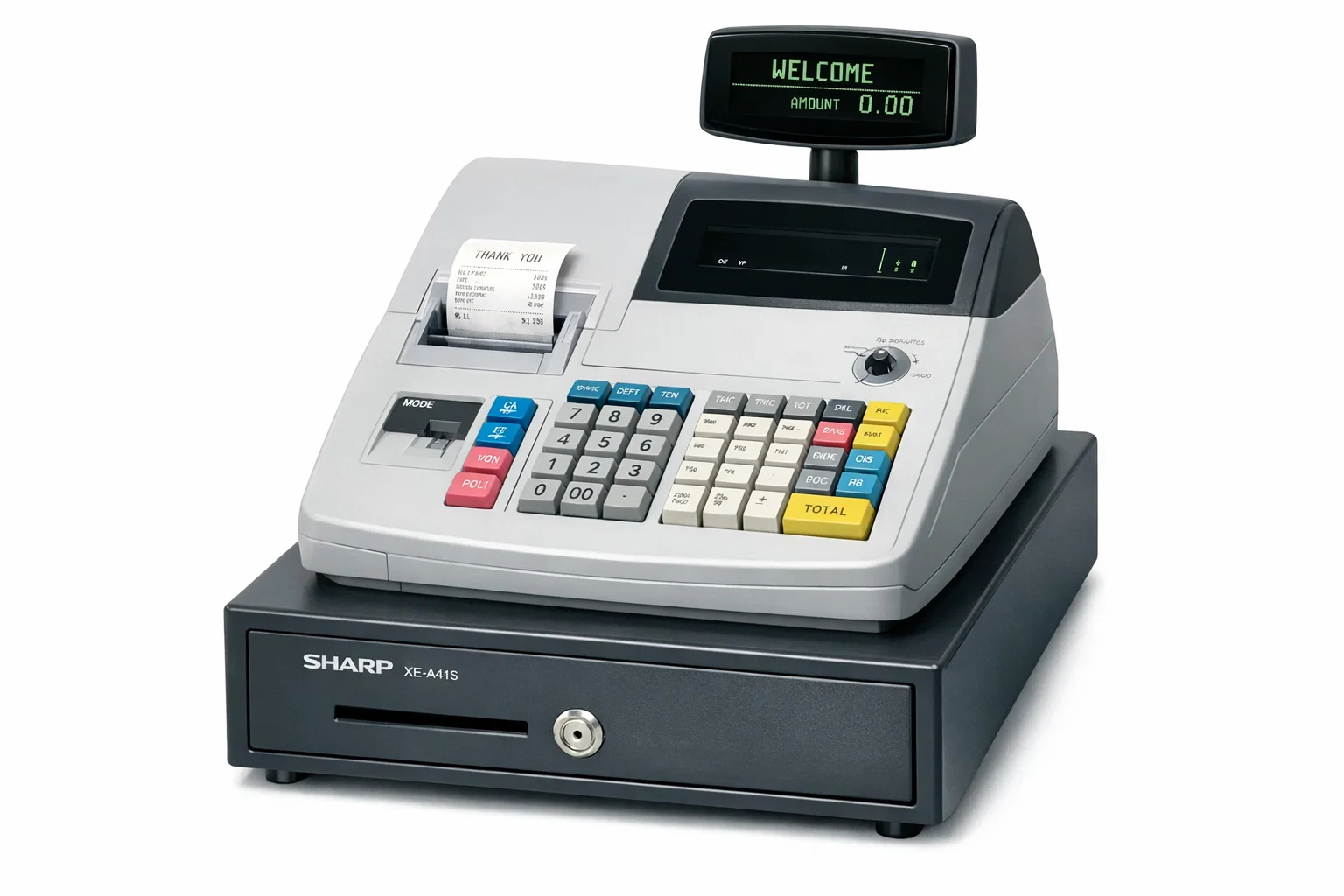
The Sharp XE-A41S Electronic Cash Register is a user-friendly and feature-rich cash register designed for retail shops, restaurants, and service businesses. It combines traditional cash handling with modern digital functionalities, making it an ideal choice for businesses transitioning from manual billing to automated systems.
Key Features of Sharp XE-A41S
1. Large Operator Display
The register comes with a clear LCD display that helps the operator view transaction details easily. It reduces errors and improves billing accuracy.
2. Customer Display
A rear display allows customers to see the transaction details, ensuring transparency and building trust.
3. Multiple Department Keys
It offers up to 99 departments, allowing you to categorize products efficiently. This is particularly useful for stores with a wide range of items.
4. PLU (Price Look-Up) System
With support for thousands of PLUs, businesses can store product details and pricing, making billing faster and more accurate.
5. Thermal Printing
The built-in thermal printer ensures fast and quiet receipt printing, enhancing customer experience.
6. SD Card Support
The SD card slot allows easy data backup and transfer. You can store sales reports and update product data effortlessly.
7. User-Friendly Keyboard
The flat keyboard design makes it easy to clean and operate, especially in busy retail environments.
Benefits of Using Sharp XE-A41S
✔ Improved Billing Speed
With pre-programmed items and PLUs, transactions are completed quickly, reducing customer waiting time.
✔ Accurate Record Keeping
It maintains detailed sales records, helping you track daily, weekly, and monthly performance.
✔ Easy Inventory Management
By categorizing products, you can monitor stock levels and make better purchasing decisions.
✔ Enhanced Customer Experience
Quick billing and clear receipts create a professional impression on customers.
✔ Cost-Effective Solution
Compared to advanced POS systems, it is more affordable while still offering essential features.
Ideal Businesses for This Cash Register
The Sharp XE-A41S is perfect for:
- Retail shops
- Grocery stores
- Clothing boutiques
- Small restaurants and cafes
- Medical stores
- Service-based businesses
Pros and Cons
✅ Pros
- Easy to use and set up
- Reliable performance
- Affordable pricing
- Supports large product database
- Compact and durable design
❌ Cons
- Limited advanced POS features
- Not cloud-based
- Requires manual updates for inventory
How to Set Up Sharp XE-A41S
Setting up the cash register is simple:
- Install the paper roll in the printer
- Insert the SD card (optional)
- Configure date and time
- Set up departments and product codes
- Start billing
With basic training, staff can easily operate it within a few hours.
Maintenance Tips
To ensure long-lasting performance:
- Clean the keyboard regularly
- Replace paper rolls on time
- Backup data using the SD card
- Keep the device away from dust and moisture
Why Choose Sharp XE-A41S Over Others?
While many POS systems are available, the Sharp XE-A41S offers a balance of simplicity, reliability, and affordability. It is ideal for businesses that do not require complex cloud-based systems but still want efficient billing and reporting.
Conclusion
The Sharp XE-A41S Electronic Cash Register is a dependable and efficient tool for managing daily business transactions. With its easy-to-use interface, robust features, and affordable price, it is an excellent choice for small and medium businesses aiming to improve operational efficiency.
If you’re looking for a practical and cost-effective billing solution, this cash register is definitely worth considering.
FAQs
1. Is the Sharp XE-A41S suitable for small businesses?
Yes, it is specifically designed for small to medium-sized businesses.
2. Can it store product data?
Yes, it supports thousands of PLUs for product storage.
3. Does it support GST billing?
It can be configured for tax calculations, including GST.
4. Is internet required to use it?
No, it works offline and does not require internet connectivity.
5. Can I backup data?
Yes, you can use an SD card to backup and transfer data easily.